
How to Enable Address Auto-Complete in HeavySet Tech Forms
Our new Address Auto-Complete feature makes it easier for users to enter their address when filling out your HeavySet Tech forms. As they begin typing, address suggestions will appear below the input field. If the correct address appears, they can simply click on it to auto-complete the field.
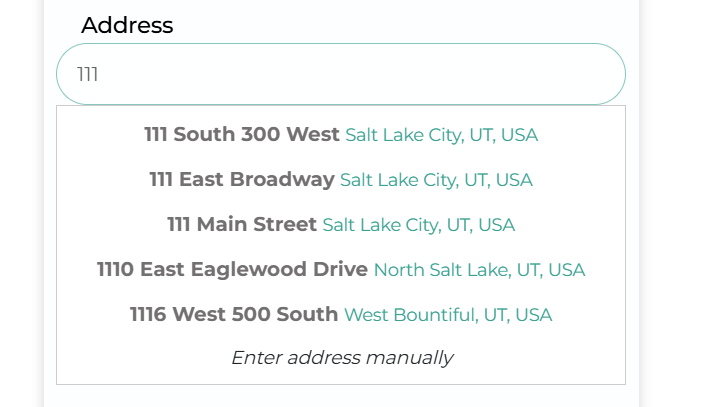
If their address does not populate, they can select "Enter address manually" at the bottom of the suggestions.
Google Maps Script Loading
HeavySet uses the Google Maps API to power the Address Auto-Complete feature. The Google Maps script will only load when Address Auto-Complete is enabled on the form. If Address Auto-Complete is disabled, the Google Maps script will not load.
This behavior helps reduce unnecessary scripts on pages that do not require address suggestions and can improve page performance.
If you want to prevent the Google Maps script from loading on a page, ensure that Address Auto-Complete is turned off for that form.
Enabling Address Auto-Complete
To activate this feature for your web forms, follow these steps:
- Log in to your HeavySet Tech admin portal.
- Navigate to Appointment Page Style Settings.
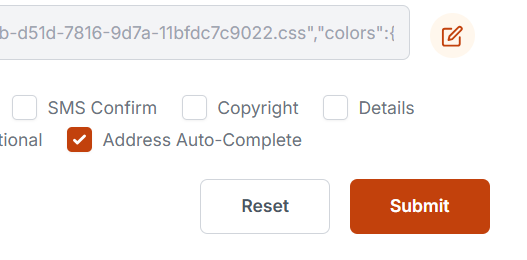
- Locate the "Address Auto-Complete" option.
- Check the box to enable it.
- Click Submit to save your changes.
Not yet using HeavySet Tech, schedule a live demo here to see how our platform can benefit your business.

Comments
0 comments
Please sign in to leave a comment.